Analyze
Take or choose item photos, review them, enter the asking price and condition, and start an analysis. One item photo is enough; label and detail photos can help.
App guide and tutorials
Use MarginLens to inspect a possible purchase, test the costs, and keep track of the outcome. The verdict and resale figures are estimates, so check the evidence and the item yourself before buying.
The four bottom tabs are Analyze, My Items, Session, and Account. Analyze starts an item or sourcing capture. My Items holds account-backed saved items available across your signed-in devices; Session holds trips and performance; Account holds plan, consent, support, and data settings.
For a single item, follow Analyze → Take a photo or Choose from your photos → Review your photos → Analyze this find. Add a clear overall photo and, when available, a label or detail view. The review screen lets you crop or replace photos and add asking price, condition, source, damage, and notes.
Approved store beta: use Pro beta tools without signing in or purchasing. Platform verification connects the installation automatically; camera/library permissions and processing consent still apply. Sign in at Save item for durable account storage. My Items, account sessions, history and export require sign-in. Wait for the assigned full-feature build; older store builds and direct Dev installs can have different access.
Take or choose item photos, review them, enter the asking price and condition, and start an analysis. One item photo is enough; label and detail photos can help.
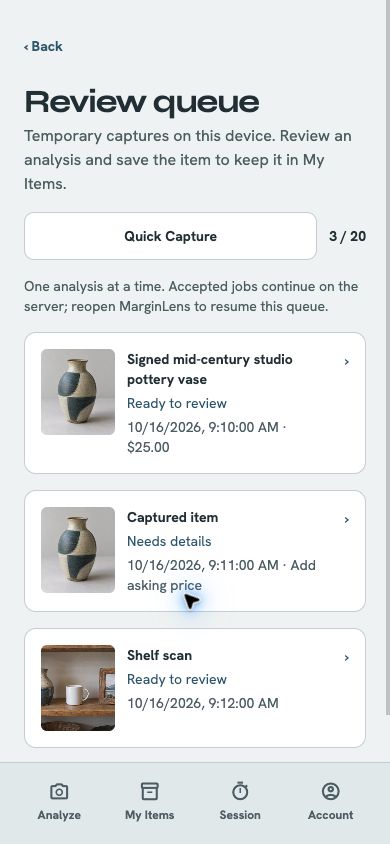
Capture individual items for later review. The queue is temporary device work (up to 20 unfinished captures); nothing uploads until you add an asking price and start analysis.
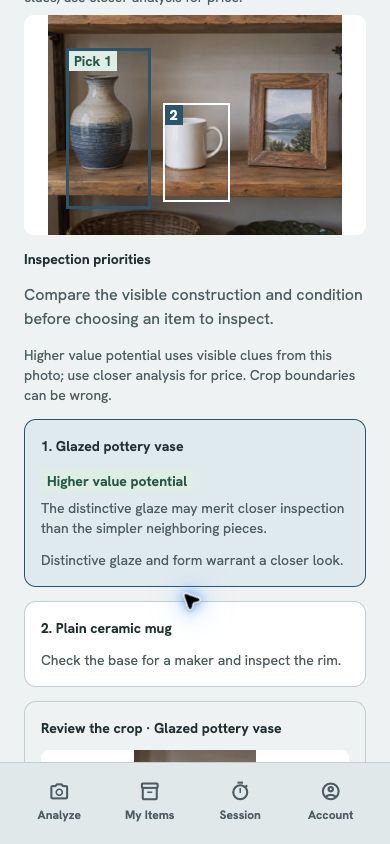
Photograph a shelf or table for bounded inspection priorities. Scout can highlight up to three items with Higher value potential when visible clues support it; it does not appraise, authenticate, promise rarity, or make a buying decision.
Open an analyzed capture, check its result, and save it to My Items. Scout crops become ordinary item drafts; add an asking price and use closer analysis before relying on one.
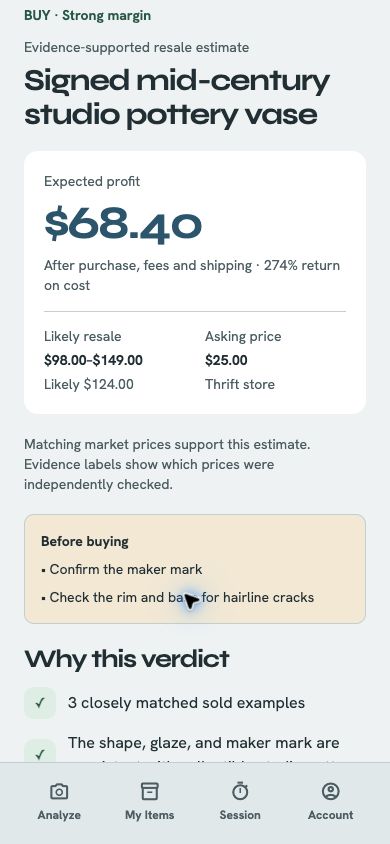
Inspect identification, confidence, cautions, market references when present, and the basis for a resale range. A result may instead be an AI estimate or have no usable estimate.
Change the purchase price, channel, platform and processing fees, shipping, and other selling costs for that find. Apply changes to update projected profit.
Record Bought, Maybe, or Passed. Save the find so you can return to the decision and its assumptions.
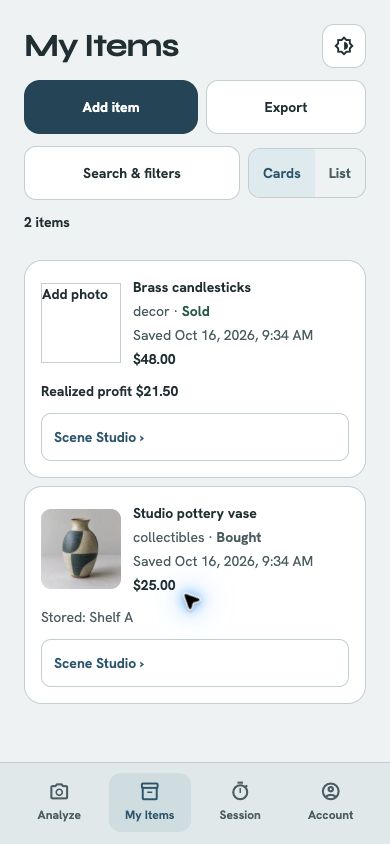
Open account-backed saved items in Cards or List view, search and filter them, and return to a result, item editor, or listing draft.
In the full-feature beta, start analysis-origin Scene Studio without an account, approve processing, review the cutout and keep up to four supplemental images. Guest images are temporary; Save item and sign in to retain the chosen set with an account item.
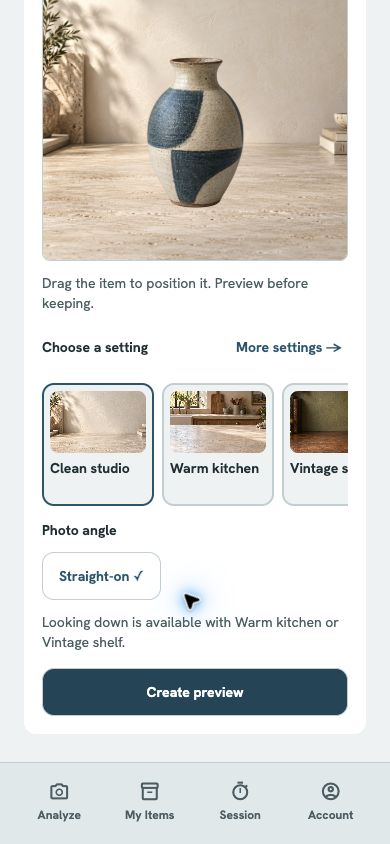
Collector and Pro can prepare supplemental staged images from a whole-item photo. Approve processing, review the cutout, choose a setting, and keep or discard each image. Keep the original item photo distinct from staged images.
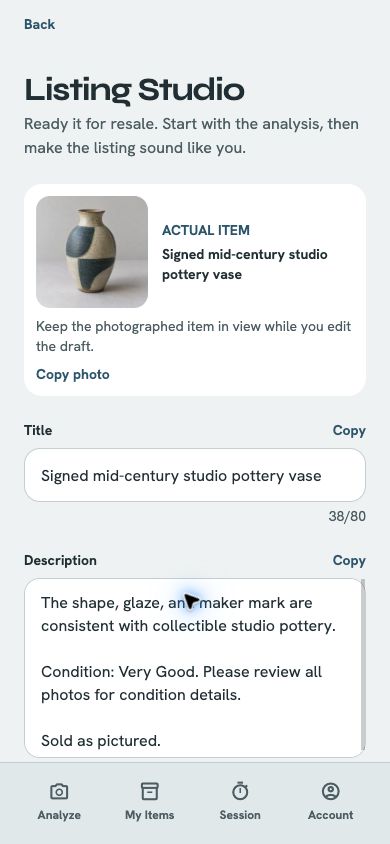
Collector and Pro can edit the title, description, suggested asking price, category, and tags, then save, copy, or share the draft. A valuation is required.
Create or edit an account-backed item, including decision, purchase and sale details, photos, and optional session association.
Export the currently visible items as a CSV through the phone's Share menu. With no filters, Export includes every saved item and its readable status.
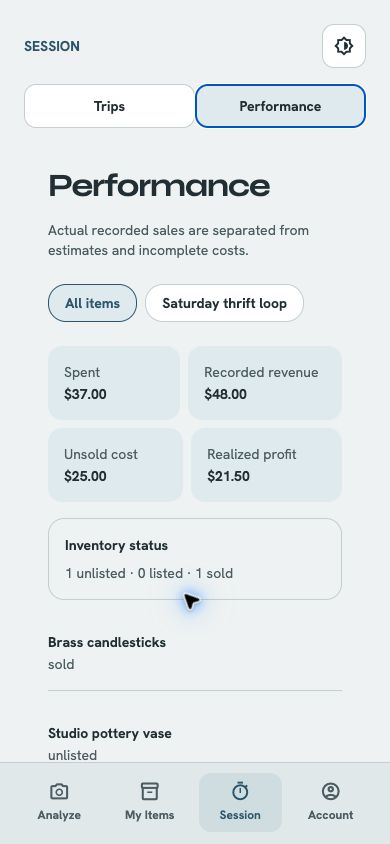
With an account, keep sourcing trips, purchased items, listing state, sale outcomes, and realized profit together.
Review plan, photo consent, permissions, support, and data settings. Last analysis ID is available here for support. Account deletion removes cloud account data and then attempts to clear device-local work.
Scene Studio, Scout Scan, Quick Capture and Review Queue, buying guidance, and the item guide are included in the planned first public release for Collector and Pro. Session and inventory performance uses recorded data and deterministic calculations. Direct marketplace publishing and Where to Go are outside the first release. Copying or sharing a listing draft does not publish it to a marketplace.
Screenshots show development app screens with sample data. Mobile-layout browser captures illustrate the screens; native permissions, recording, and store checkout may look different.
Try this with an item you are free to photograph; you can stop before making a purchase. In the assigned full-feature beta, Pro tools work without signing in; Save item and account features require sign-in.
Listing Studio is planned for Collector and Pro. It starts from a result with a valuation.
My Items is an account-backed field ledger for inventory and sourcing sessions.
Quick Capture keeps unfinished item captures on this device until you are ready to add details and analyze them.
Scout is visual triage for a shelf or table, not an appraisal or authenticity check.
Session summarizes recorded inventory and costs so you can compare estimates with actual outcomes.
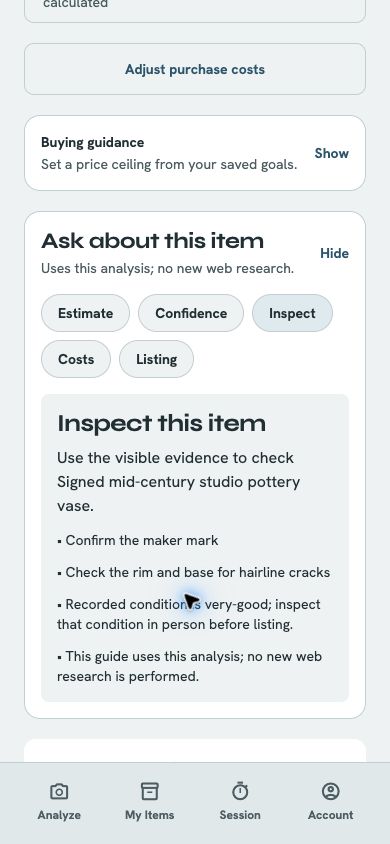
Buying guidance and Ask about this item use the selected result, channel costs, and saved goals; they do not perform live web research.
Scene Studio keeps the original item photo unchanged while you review a cutout and create up to four supplemental staged images.
Planned US pricing: Try five analyses free. This is an app allowance, not an Apple or Google subscription trial: five total per account, with no replenishment at month boundaries, after reinstalling or signing out, after deleting items, or after cancelling or downgrading a subscription. Failed analyses are refunded and duplicate retries are safe. After five, you can subscribe or buy a non-expiring analysis pack. Collector has 100 paid analyses per month at $9.99/month or $99.99/year; Pro has 250 at $19.99/month or $199.99/year. Saved items, core evidence, and CSV export remain accessible. Collector and Pro include the same current tools: Quick Capture and Review Queue, Scout Scan, Listing Studio, Scene Studio, buying guidance and item guide, and session and inventory performance reports. Pro provides higher analysis volume. A non-expiring pack of 50 extra analyses is planned at $9.99 for any tier; purchased credits do not unlock paid features. Stores will show final local prices and purchase terms at launch.
Usage accounting: each successful item analysis uses 1 available analysis, with your included allowance used before purchased credits. Paid plan allowances refresh monthly. Scout uses 1 analysis, and each separately chosen item analysis from Scout uses 1 additional analysis. Scene Studio has a separate planned allowance of 50 item sets per month for Collector, 100 for Pro, and 0 for Free; each set starts when its whole-item cutout is approved, can keep up to 4 images, and does not consume an ordinary item-analysis allowance. Failed attempts and retries do not silently double-charge an allowance.
Full-feature beta exception: verified ordinary store betas include 250 analyses per month and 100 Scene Studio item sets per month, up to four kept images per set, under shared operating limits. These are testing allowances, separate from the public offer and from purchased credits. Scene sets are separate from analyses. Ordinary beta checkout is disabled. Dedicated Sandbox billing builds opt out and require an explicitly supervised no-charge billing test; they are not the ordinary beta. Larger explicit testing grants are preserved. Limits or a service pause can stop processing before the monthly allowance is exhausted; Account shows the access state.
My Items uses an account for saved items, retained source photos, and sourcing sessions across signed-in devices. Quick Capture and unfinished Scout work stay temporary on this device until you save an item; selected photos upload only when you approve the analysis or Scene Studio consent. Review the privacy policy for provider and retention details.
In Account, Delete account and cloud data removes the sign-in account, cloud analyses and photos, My Items records, Scene Studio images, and plan records, then attempts to clear device-local work. If local cleanup reports an error after the account is deleted, contact support. This cannot be undone. Deleting the account does not cancel a store subscription; manage that separately. For help, use the Last analysis ID in Account or email support@focalward.com.
Guest analysis and Scene work require consent even without account sign-in. Guest approvals do not automatically enable account photo sync. Use Discard or Remove capture to request cleanup of the selected temporary guest work. It does not reset the beta allowance or remove a saved account copy. Keep account sessions, history and export behind sign-in. See the privacy and deletion pages for guest retention, recovery and account boundaries.
Please keep private records, passwords, and recovery phrases out of support messages. Use the privacy, deletion, and support links below for this product.