Find each tool in the app, then follow practical walkthroughs using your own observations. Peri-Lens describes a personal record; it does not diagnose, predict, or recommend treatment.
Peri-Lens is coming soon. The screens and paths below describe the current app design; Plus pricing and provider-dependent features remain planned until public release.
Start with your own record.
Choose Start a new journal, then set up the symptoms you want to track and, if useful, your period pattern. Choose monthly or annual Plus and confirm with Apple or Google to start an eligible one-month store trial. Downloading or completing setup alone does not start access. You can change symptoms and tags later in More → Symptoms & tags. Local journaling with active store access, purchases, Restore purchases and eligible AI features do not require a Peri-Lens account. An optional account connection and a separate sync phrase are needed for encrypted backup and recovery.
Returning users can choose Restore a saved journal before setup. Sign in to the same account, enter the existing sync phrase once, then confirm Download and replace. This recovers the last uploaded journal; it does not start a new trial or restore subscription access. Recovery remains available after Plus ends.
The five bottom tabs are Today, Timeline, Insights, Trial, and More. Start with one short check-in on Today. Record only what you noticed. A day you skip is never treated as a day with no symptoms.
Where to find each feature.
More → Descriptive trends
Review calculated ranges, recorded-day coverage, and patterns without treating associations as causes or diagnoses.
Today
Begin today’s check-in or record a Quick symptom episode. Review or revise today’s entry here.
Timeline
Open an earlier day or episode to review and edit what you recorded. Unrecorded days remain unknown.
Insights
Read descriptive trends, create a local weekly review, or choose a bounded Ask My History question. The store trial and Plus include 90-day and one-year calculated ranges.
Trial
Choose an available clinician-reviewed template or create your own routine plan, record a baseline and observation period, then compare the observed days. Creating a new trial requires active store-trial or Plus access; existing trials remain accessible.
More → Appointment brief
Set a visit date and range, add goals and questions, choose sections, then save, preview, copy, or export a PDF. Creating a new brief requires active store-trial or Plus access.
More → Care plan / Treatment & change timeline
Record the care steps, medicines, supplements, and routine changes you want to remember alongside your observations. New entries and edits require active store-trial or Plus access; saved entries remain accessible.
More → Learning library / Symptoms & tags
Read learning cards and tailor the symptoms and context tags used in your check-ins.
More → Connected health / Account & journal recovery
Choose optional read-only health imports or open Journal backup & restore in account settings. New imports and encrypted uploads require active store-trial or Plus access. Recovery downloads remain available after access ends.
More → Plan & allowances / Account & journal recovery
Review access and usage, set reminders and app lock, export your record, or manage device and account deletion separately.
AI weekly insights, AI appointment summaries and voice transcription require verified paid Plus for public customers; the public store trial does not include them. Authorized beta and temporary review access can include AI under the separate testing rules. All three require transfer consent, provider availability and the normal monthly allowances. Voice creates editable proposed fields, and a recording is sent only after you confirm. AI weekly reviews and local or AI appointment summary drafts remain unsaved until you review and explicitly save them.
Practical walkthroughs.
Screenshots show development app screens with sample data. Mobile-layout browser captures illustrate the screens; native permissions, recording, and store checkout may look different.
Build a seven-day observation record
Use a week to see how a small, honest record becomes easier to review.
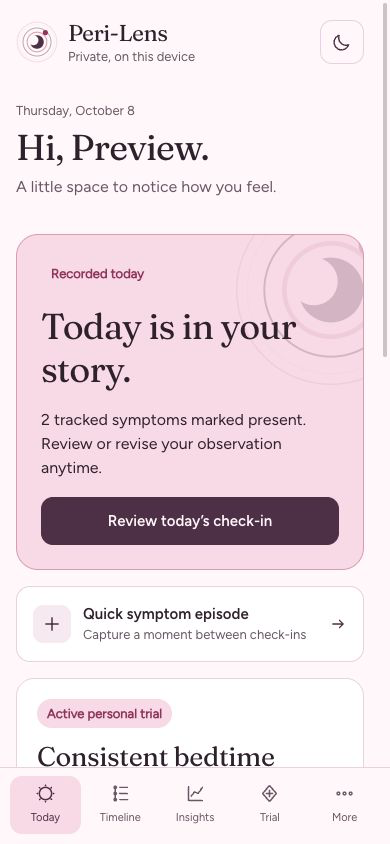
Today shows a saved sample observation. Use Review today’s check-in to reopen it, or Quick symptom episode for an event between check-ins.View full-size screenshot
Open Today → Begin today’s check-in. Mark only the symptoms you experienced and add intensity, impact, sleep, bleeding, stress, or context when useful. If an entry is already saved, choose Review today’s check-in to reopen it.
Choose Review impact & context, add an optional note, and save. Repeat on days you want to record.
For a symptom that happens at a particular moment, use Today → Quick symptom episode to record its timing, duration, or count.
Open Timeline to revise an entry. Then visit Insights → Create local review to inspect the observed days and missing-day coverage.
Prepare for a care conversation
Make a patient-created discussion aid from the record you have. Creating a new brief requires active store-trial or Plus access.
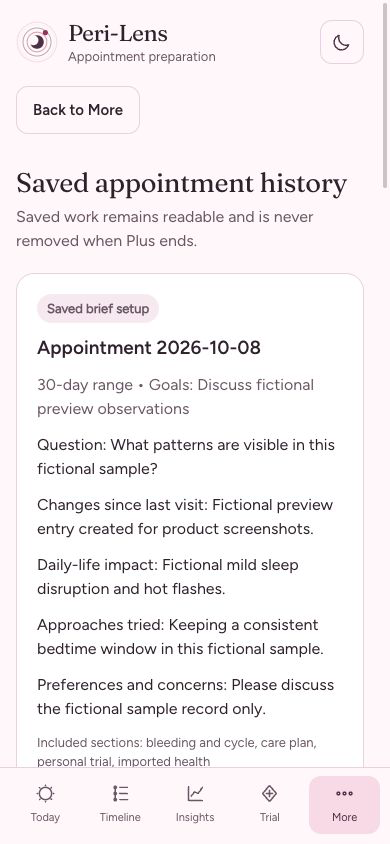
A saved sample appointment brief remains readable after Plus ends. Review the selected sections and questions before sharing.View full-size screenshot
Go to More → Appointment brief and choose the visit date and record range.
Add one goal and one question, then write any context you want the clinician to understand.
Choose the sections to include and select Save and preview brief.
Read it for accuracy, then copy it or export a PDF to bring to the appointment. If you create a local structured summary or use optional AI wording, review the generated draft before choosing Save reviewed summary draft.
Compare one routine change
This is a descriptive personal trial, not a test of cause and effect. Starting a new trial requires active store-trial or Plus access.
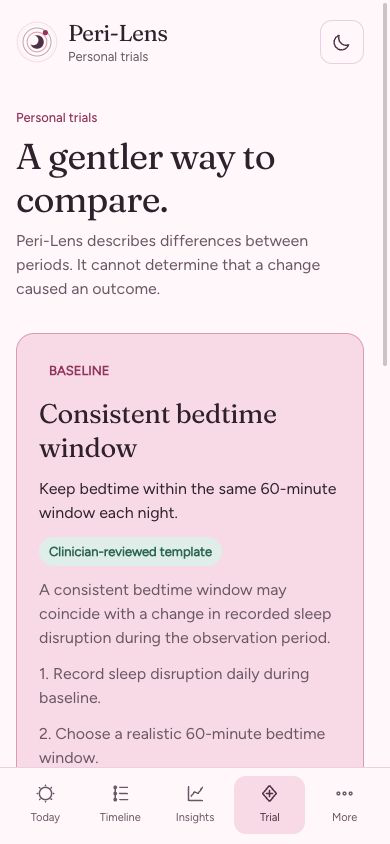
The personal-trial screen separates baseline and observation. A personal trial describes your record; it does not establish cause and effect.View full-size screenshot
Open Trial → Create a personal trial → Create my own plan .
Choose one non-prescription routine change and one outcome already in your record, then Start baseline.
Keep your usual routine during the baseline and record check-ins when you can. Then select Start observation period.
Record adherence and other changes that may matter. Select Finish observation and compare to see the recorded differences and coverage.
Review a week and ask your history
Local reviews remain available with saved records. Public AI drafting requires paid Plus, consent, and available allowance.
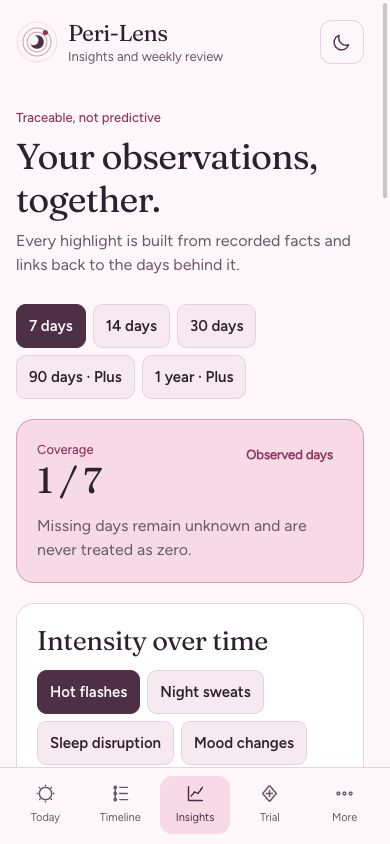
Start in Insights. The coverage card makes missing days visible before you create or review a weekly summary.View full-size screenshot
Open Insights → Create local review. Read the recorded facts, missing-day coverage, and suggested questions.
Add My reflection (editable) and choose Save my reflection when useful. Reopen a saved review in Saved review history.
Use Ask my history to choose a supported question about recorded information. Saved-record access includes questions through 30 days; longer calculated ranges require current trial or Plus access.
For optional AI wording, choose Draft with AI, review the disclosure, then Send and draft. Only the disclosed review facts and evidence are sent, not your full journal or private notes.
Read and edit the proposed wording. Choose Save reviewed AI draft only when you want to keep it; generating a draft does not save it automatically.
Turn a voice note into a reviewed check-in
For public customers, transcription requires paid Plus. It creates proposed fields for you to review, never a diagnosis or an automatically saved entry.
In More → Account & journal recovery, enable Allow AI summaries and voice transcription after reading the transfer disclosure.
Open Today’s check-in and choose Enable voice transcription, then Record a voice check-in. Allow microphone access if prompted.
Record up to one minute and choose Stop recording. Play recording to check it or Discard recording to remove it.
Choose Review disclosure and send, then confirm Send recording. Recording alone does not upload the audio.
Review and correct the proposed symptoms and context. Continue through Review impact & context and choose Complete today’s check-in, or Save changes when editing.
If audio cleanup fails, choose Retry audio cleanup before recording or sending another clip. Provider availability, consent, and monthly limits still apply.
Keep care steps and changes together
Record your own care information without turning the journal into treatment advice. New entries and edits need current logging access.
Open More → Care plan to record the care steps, goals, and questions you want to remember.
Open More → Treatment & change timeline → Record a change.
Set Date, Change type, Item category, Name, and What changed?. Optionally add a reason, effects you noticed, and a follow-up date.
Choose Save change. Review it alongside your observations without assuming it caused a symptom change.
Correct a saved entry when needed or use Delete entry and confirm to remove it.
Choose read-only health imports
Health imports are optional and require current trial or Plus access. Peri-Lens does not write records back to the health store.
Open More → Connected health on a supported native device.
Read the permission explanation and select only the measures you want to import.
Cycle data has a separate choice: enable Import menstrual flow records only if you want those records included.
Choose Request access and import, then review the device permission prompt and the result. Declining permission does not stop manual logging.
Change permissions in the device’s health settings; on Android, use Manage Health Connect access. The browser preview does not provide native health imports.
Back up and recover your journal
Cloud recovery uses an optional account and a separate sync passphrase. It is distinct from Restore purchases.
Open More → Account & journal recovery → Journal backup & restore and connect your optional account.
Set Device name and Sync passphrase; confirm the passphrase when creating recovery. Keep it safe: support cannot recover it.
With current trial or Plus access, choose Upload this device and confirm the reviewed upload. Signing in alone does not back up the journal.
Before replacing a device record, export anything newer that you want to keep. Choose Download latest remote data, enter the existing passphrase, review the replacement, and confirm Download and replace.
Returning users can also choose Restore a saved journal before setup. Recovery downloads remain available after Plus ends, but recover only the last uploaded revision.
Restore purchases recovers store access, not journal entries or passphrases. A JSON export is an archive, not an in-app restore file.
Set reminders, export, and manage privacy
Choose your controls and review what each action affects before sharing or deleting.
Open More → Account & journal recovery. Choose Discreet daily reminder and Reminder hour (0–23) if helpful.
Enable Device biometric / passcode app lock for an additional screen lock. This does not encrypt the local database.
Choose Export all data as JSON to keep an archive. Store it privately: exports can contain sensitive information.
Use Delete data from this device for device cleanup, or Delete account and all data for the account-deletion flow. Read the confirmation and deletion guide before proceeding; exported copies and store billing have separate controls.
Manage a subscription or cancel renewal through the Apple or Google account that purchased it. Removing the app or account does not cancel store billing.
Plans and access.
Eligible one-month store trial, confirmed at checkout. Plans renew unless canceled through store settings; cancel before trial renewal to avoid the next charge. Plus is planned at $4.99/month or $49.99/year in the US. New local logging requires verified trial or paid Plus access, or separately authorized beta/review access. Existing issued access keeps its original terms; no new account trial starts. Saved records, local weekly reviews, Ask My History through 30 days, saved briefs, existing personal trials, export, deletion and encrypted recovery remain accessible. Check current access in More → Plan & allowances. The public store trial includes logging, new personal trials and briefs, longer trends, health imports and encrypted backup after account/sync-phrase setup. Paid Plus adds AI transcription and AI drafting with separate transfer consent and monthly limits. See the full capability comparison.
Health imports are optional and read-only. Cycle imports have separate consent. Encrypted sync requires an account and a separate passphrase; export and deletion are separate actions. Recovery downloads replace the device record with the last uploaded revision after confirmation; export first if you want to keep newer local entries. A JSON export is an archive, not an in-app restore file. Restore purchases restores payment access, not the journal or passphrase. Use More → Account & journal recovery to manage the device record, and see the privacy policy and deletion guide for the full scope.
Please keep private records, passwords, and recovery phrases out of support messages. Use the privacy, deletion, and support links below for this product.